Features

Everything SmartDecrypt does

SmartDecrypt has one job: open your password-protected PDF, ZIP and 7z files with as little typing as possible. Here's the complete list, including what's Pro and what differs on Windows.

Checked against the app source code on 21 November 2026 (version 1.2 for iPhone, iPad and Mac).

Patterns

Password patterns

A pattern pairs a file-name pattern with a password and the file types it applies to. Use * for any text: Statement_*.pdf, *payslip*, Invoice-*. A pattern without * matches names that start with it. Matching ignores case.

  • Most specific wins: if Statement_*.pdf and Statement_*Tax*.pdf both fit, the second, with more fixed text, supplies the password
  • When you save a password from the unlock prompt, it's kept only after it has opened the file, so a typo never becomes a saved pattern
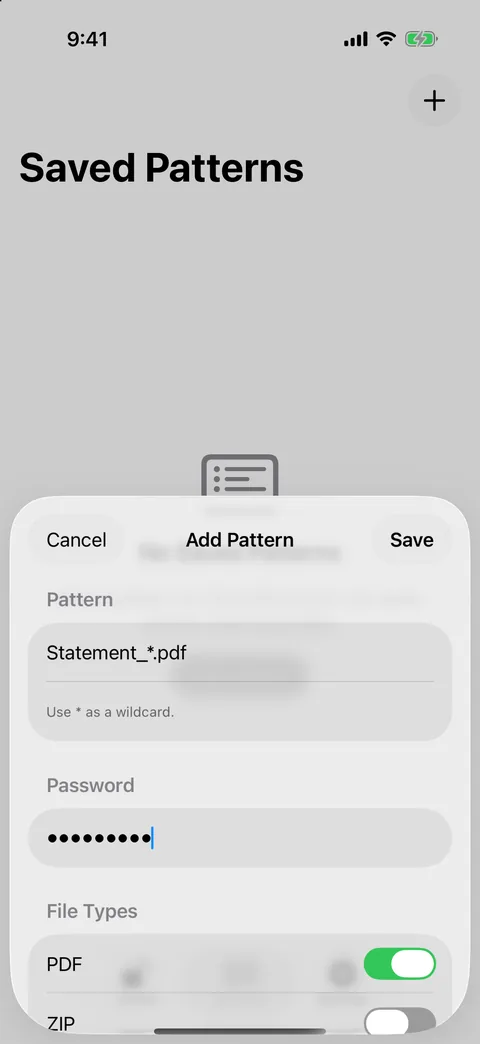
SmartDecrypt Add Pattern sheet

Formats

PDF, ZIP and 7z

PDFs are re-saved as an unlocked copy named name_unlocked.pdf. ZIP and 7z archives, including AES-encrypted ones, are extracted to a folder. Archives without a password extract straight away.

RAR, CBZ, CBR and other formats aren't supported. Some unusual cases, such as certificate-protected PDFs and split archives, haven't been tested.

Windows

Right-click to unlock

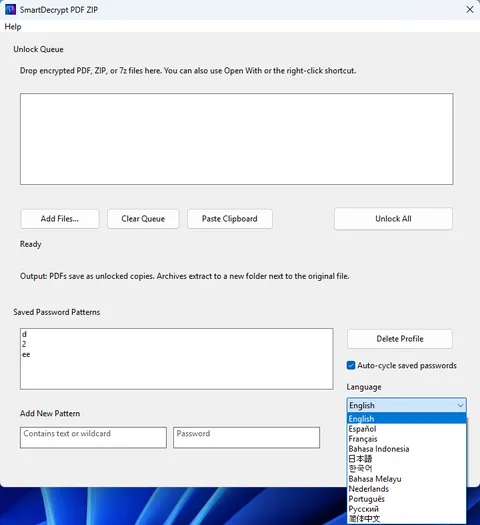
The Windows app adds Unlock with SmartDecrypt to the right-click menu and to Open With. Queue several files, paste from the clipboard, and turn on Auto-cycle saved passwords.

SmartDecrypt for Windows main window

Details

Small things that make it dependable

Free

Keychain storage

Passwords are stored by the operating system: the Keychain on iPhone, iPad and Mac, Credential Manager on Windows. Pattern details are kept separately, encrypted.

Free

Unicode passwords

Chinese, Japanese and Korean characters and emoji in passwords work as typed.

Free

Originals stay put

SmartDecrypt never overwrites or deletes the protected file.

Free

Share sheet

Unlock a file from Mail, Files or any app with a Share button on iPhone and iPad.

Free

11 languages

English, Simplified Chinese, Japanese, Korean, Malay, Indonesian, Portuguese, Spanish, French, Dutch and Russian.

Pro

Batch loading

Select or share many files at once on iPhone, iPad and Mac.

Pro

Password cycling

Not sure which saved password fits? SmartDecrypt tries the matching pattern first, then your other saved passwords, and stops at the first that works. It never invents passwords.

Free and Pro

What's included on iPhone, iPad and Mac

FreePro
Unlock PDF, ZIP and 7zOne file at a timeMany at once
Saved patternsYesYes
Keychain storage, Unicode passwordsYesYes
Share sheet and Mac drag and dropYesYes
Try all saved passwords on a fileNoYes

Pro is a one-time purchase with a 7-day free trial; see the App Store for the price in your country. On Windows, SmartDecrypt is a paid app with a free trial on the Microsoft Store and includes every feature.

Try it on next month's statement.

Free to download on the App Store.