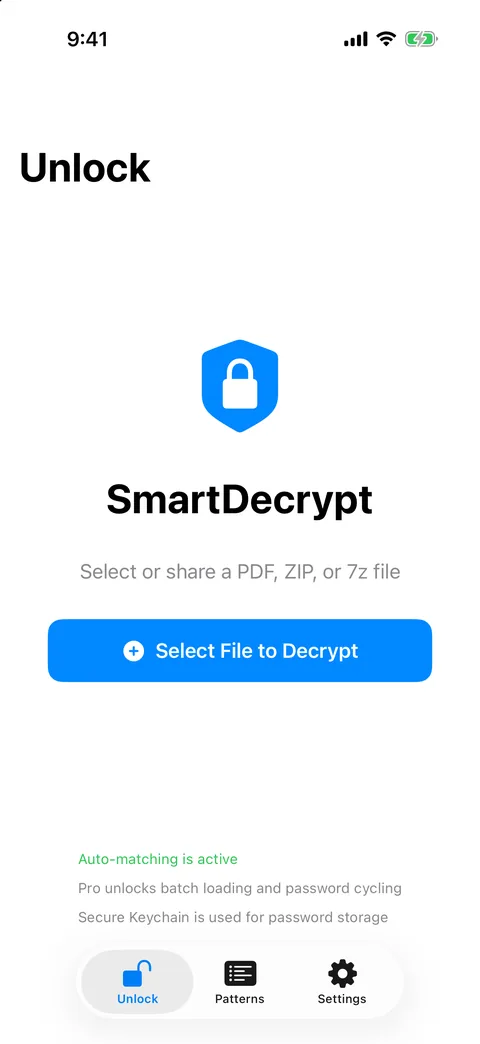
Save the password once. Unlock every statement after it.
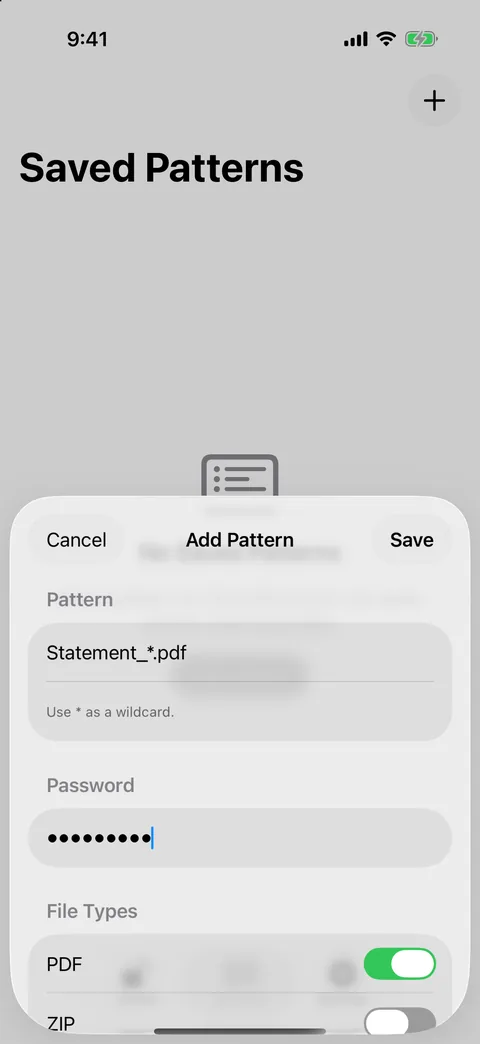
Banks, payroll and suppliers often protect every file with the same password. SmartDecrypt remembers it against a file-name pattern like Statement_*.pdf, then unlocks each new PDF, ZIP or 7z file that matches, right on your device.
Free download on the App Store, with an optional one-time Pro upgrade. Paid app with a free trial on the Microsoft Store.
Your password, your filesWorks only with passwords you provide or have saved
Patterns, not guessworkThe most specific matching pattern supplies the password
Stored like your loginsPasswords live in the Keychain or Windows Credential Manager
Never uploadedFiles are unlocked on the device; the app has no analytics
Try it
Which saved pattern unlocks which file?
Edit the patterns or type a file name. The matcher below follows the app's rules: matching ignores case, * stands for any text, each pattern can be limited to file types, and when several patterns fit, the most specific one wins.
Illustrative demo running in your browser with sample file names. No files, passwords or names are processed or sent anywhere.
How it works
Built for files that keep arriving with the same password
Patterns
Teach it once, per sender
Add a pattern such as Statement_*.pdf or *payslip* with the password that sender uses, and choose which file types it applies to. From then on, a matching file is unlocked without you typing anything.
* matches any text; matching ignores upper and lower case
When several patterns fit, the most specific one wins
Passwords with Chinese, Japanese, Korean characters or emoji work
Unlock
A clean copy, and your original untouched
For a PDF, SmartDecrypt writes a new copy named name_unlocked.pdf that opens without a password. ZIP and 7z archives are extracted into a folder named after the archive. The protected original is never changed or deleted.
Unencrypted ZIP and 7z files extract without a prompt
No pattern yet? Enter the password once, and save it as a pattern after the file opens
The unlocked PDF has no password, so anyone with that copy can open it. Keep or delete it accordingly.
Every platform
From the Share sheet, the Dock or Explorer
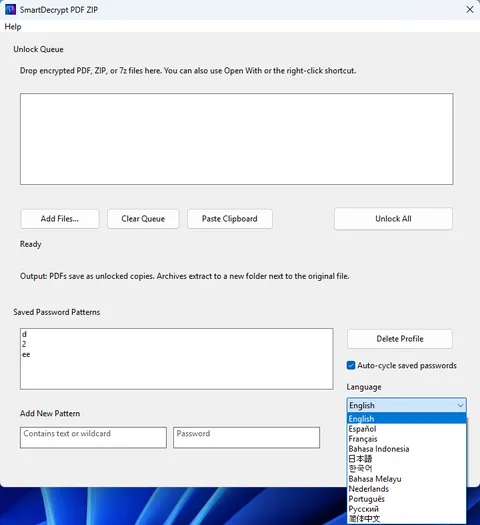
On iPhone and iPad, share a PDF or archive from Mail or Files straight into SmartDecrypt. On the Mac, drop files into the window and choose where unlocked copies go. On Windows, right-click a file and choose Unlock with SmartDecrypt.
Loading several files at once and trying all saved passwords are Pro features on iPhone, iPad and Mac.
Get started
Three steps
1
Open a file
Select or share a protected PDF, ZIP or 7z file into SmartDecrypt.
2
Enter the password once
If no pattern matches yet, type the password. Once the file opens, save it as a pattern for that sender.
3
Let the next one unlock itself
Files whose names match your pattern are unlocked with the saved password automatically.
Platforms
Where SmartDecrypt runs
One App Store purchase covers iPhone, iPad and Mac. The Windows app is a separate Microsoft Store product.
iPhone & iPad
Mac
Windows
Unlock PDF, ZIP and 7z
✓Yes
✓Yes
✓Yes
Saved patterns, most specific wins
✓Yes
✓Yes
✓Yes
Password storage
Keychain
Keychain
Windows Credential Manager
Open files from
Share sheet, Files
Drag and drop, file picker
Right-click menu, Open With, drag and drop
Several files at once
✓Pro
✓Pro
✓Unlock queue
Try all saved passwords
✓Pro
✓Pro
✓Auto-cycle option
Requires
iOS / iPadOS 16 or later
macOS 13 or later
Windows 10 (2004) or later
Price
Free download, optional Pro
Same purchase as iPhone and iPad
Paid app with a free trial
Checked against the app source and store listings on 21 November 2026.
Questions
Short answers
Can SmartDecrypt recover a password I've forgotten?
No. It only uses passwords you enter or have saved. Look for the password in the email or message that came with the file, or in your password manager.
Which file types does it support?
Password-protected PDF, ZIP and 7z files. RAR, CBZ, CBR and other formats aren't supported.
Are my files or passwords uploaded?
No. Files are unlocked on your device, and saved passwords stay in your device's Keychain or Windows Credential Manager. On Apple devices, the App Store is contacted only for purchases and the free trial.
What does Pro add?
On iPhone, iPad and Mac, Pro lets you load several files at once and try all your saved passwords on a file. It's a one-time purchase with a 7-day free trial.